 English
Communication I/O Module: Why Interface Verification Comes First
A practical guide to identifying the PEC80-CIO device, checking installed interfaces and preparing a model-specific replacement inquiry.
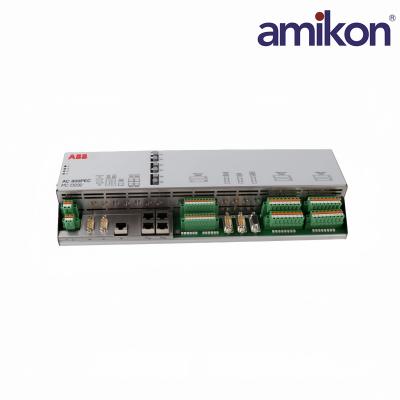
A replacement request for ABB 3BHE022293R0101 PCD232A Communication I/O Module should begin with the installed label and the system drawings—not with connector appearance. The ABB-authored PC D232 A01 data sheet identifies this order code as PEC80-CIO / PC D232 A0101, a combined digital and analog I/O device generally used in UNITROL 6000 systems. View the historical ABB data sheet ↗
For maintenance teams, the practical question is whether the replacement matches the application, firmware, wiring and communication settings already in service. A shared family name does not establish interchangeability.
|
01 · IDENTITY
PEC80-CIO PC D232 A0101 |
02 · DIGITAL I/O
12 DI / 16 relays 24/48 V input groups |
03 · ANALOG I/O
3 AI / 3 AO Bipolar signal ranges |
04 · SUPPLY
24 V DC Redundant inputs |
The values below are from ABB data sheet 3BHS224075E02, July 2007. They are reference values for the documented device, not a substitute for current project documentation.
| Parameter | Specification |
|---|---|
| Power & Environment | |
| Supply range | 20–28 V DC |
| Maximum supply current | 2 A |
| Operating temperature | −25 to +70°C |
| Signal Interfaces | |
| Analog inputs | ±10 V or ±20 mA |
| Analog outputs | ±10 V |
| Temperature inputs | 3 PT100/PTC interfaces |
| Communication | |
| Ethernet | 4 ports, 10/100 Mbps |
| Panel interface | RS232 |
| Other interfaces | RS485 Modbus and CAN |
| Optical module | 3 optical links |
| Service Check | |
| Before installation | Verify revision, address, application software and redundant configuration. |
|
0101 · IDENTIFY Photograph the complete label and record the installed revision. |
0202 · MAP Compare terminal assignments, signal types and network settings with the drawings. |
0303 · VERIFY Have qualified site personnel confirm application and commissioning requirements. |
When a communication alarm or intermittent signal appears, record the fault context before disconnecting anything. Useful evidence includes status indications, the affected channel, recent wiring changes, supply measurements and the configured network path. This evidence helps distinguish a module issue from a field-device, cabling or configuration problem.
A PCD232A replacement decision should connect the installed hardware identity with the plant’s drawings, configured interfaces and maintenance evidence. Use the three checks below to prepare a clearer review before sourcing or installation.
01 · PLAN THE SPARE
Capture the exact identityRecord the full order code, hardware revision and clear nameplate photographs from the installed unit. |
02 · RECORD THE FAULT
Preserve useful evidenceNote alarms, status indications, affected channels, supply readings and any recent wiring or configuration changes. |
03 · REVIEW THE MATCH
Compare more than appearanceCheck terminal assignments, signal ranges, communication settings and application software against project documentation. |
Discover six recently added ABB products for automation, control and system maintenance.
The historical ABB data sheet maps 3BHE022293R0101 to PC D232 A0101, PEC80-CIO.
No. The documented device combines digital, analog and temperature interfaces with communication functions.
Do not assume so. Verify the complete order code, hardware revision, application software and installed configuration.
Yes. The historical data sheet specifies redundant 24 V supply inputs. Check the actual installation and its protection arrangements.
No. Availability, condition and delivery must be confirmed for each quotation.
Record the alarm, status indications, supply condition, cabling and configuration before replacing hardware; follow the site procedure.
Send the complete model, label photographs, quantity, installed system, revision, destination and required delivery date.
MODEL-SPECIFIC SALES SUPPORT
Share your requirements with Lisa for product identification, sourcing coordination and an availability review.
Please include:
• Quantity and required condition
• Delivery destination and target date
• Installed revision and clear label photos
Opens your email app with the model and inquiry checklist prefilled. You can also send photos through WhatsApp.
Lisa Lin supports Amikon’s international automation-parts inquiries and sourcing coordination. Professional profile ↗

Get regular updates and real automation insights straight to your inbox.


 IPv6 network supported
Disclaimer: Amikon sells new and surplus products and develops channels for purchasing such products. This website has not been approved or recognized by any of the listed manufacturers or trademarks. Amikon is not an authorized distributor, dealer, or representative of the products displayed on this website. All product names, trademarks, brands, and logos used on this website are the property of their respective owners. The description, explanation, or sale of products with these names, trademarks, brands, and logos is for identification purposes only and is not intended to indicate any association with or authorization from any rights holder.